NEWStudioCube by GetyourStudio

The complete video, clip and podcast studio, installed in a single day

A ready-to-use studio for education, corporates and government. Anyone can record professional video on their own, without technical knowledge and without a technician.

Book a demo
Download the factsheet PDF, 6 pages, instant download
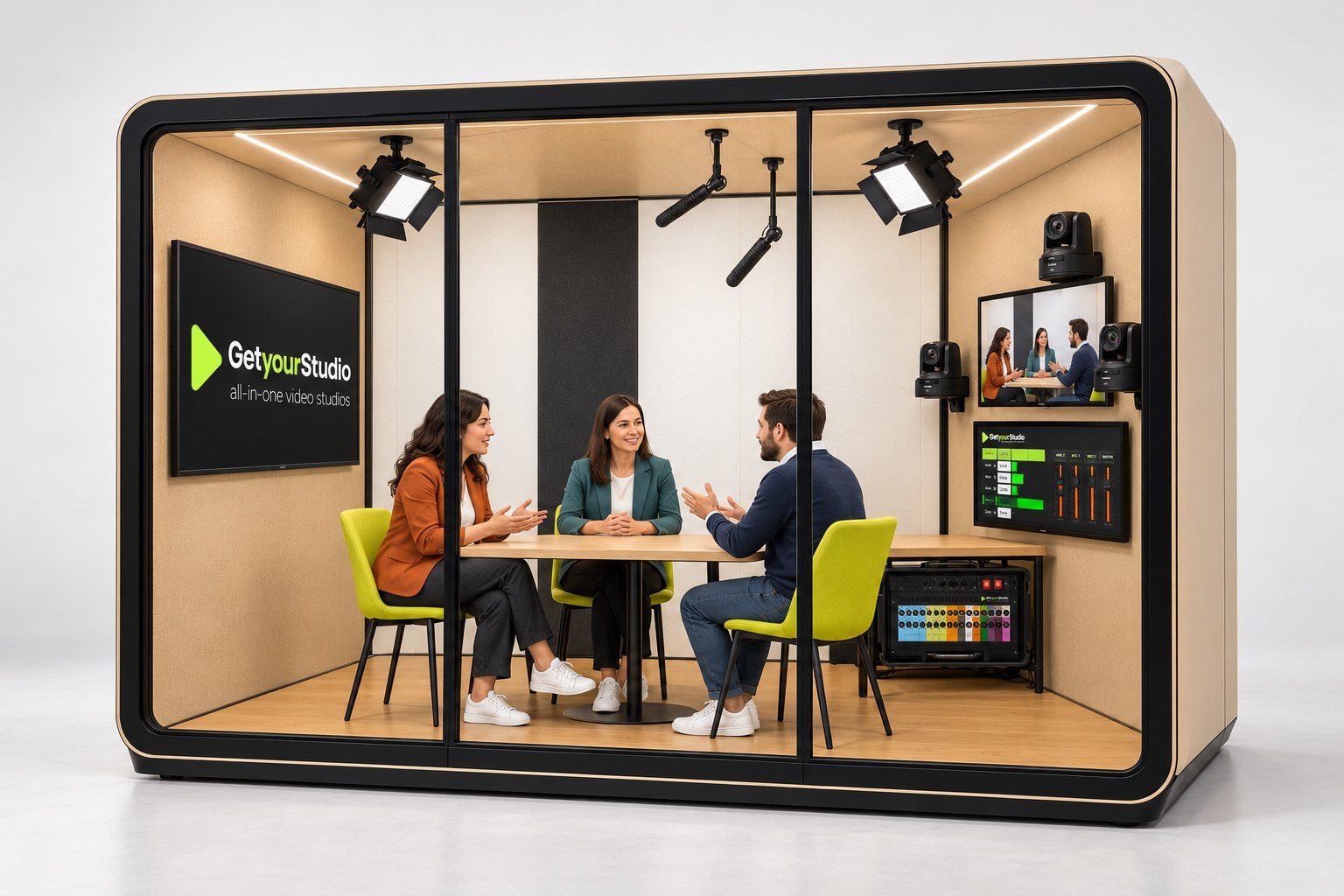
StudioCube LARGE with three people at a table during a recording
  • 2formats, COMPACT and LARGE
  • 1 dayinstallation, no building work
  • 1 clickto start a recording
  • 1 or 3Canon PTZ cameras, per format
  • DIYStudioAssist video software included, everyone records themselves
  • Everythingincluded: audio and video hardware, installation, training and support

How it works

Walk in, record, done

Users focus on the content, the studio takes care of the rest. From start to video in your own folder in five steps.

  1. Start

    Choose your template and start recording with one click.

  2. Record

    Switch between camera, PowerPoint and video. Your name and job title appear on screen automatically.

  3. Review

    Watch the recording straight away on the screen and approve it.

  4. Receive

    The video lands in your own folder, or goes to Panopto or Kaltura automatically.

  5. Cleaned up

    The recording is removed from the studio system. The next user starts with a clean slate.

Want to see how quick it is? Book a demo

Formats

Two formats, one way of working

Both formats use the same templates and the same wizard in StudioAssist. The difference lies in the space and the type of recordings you want to make.

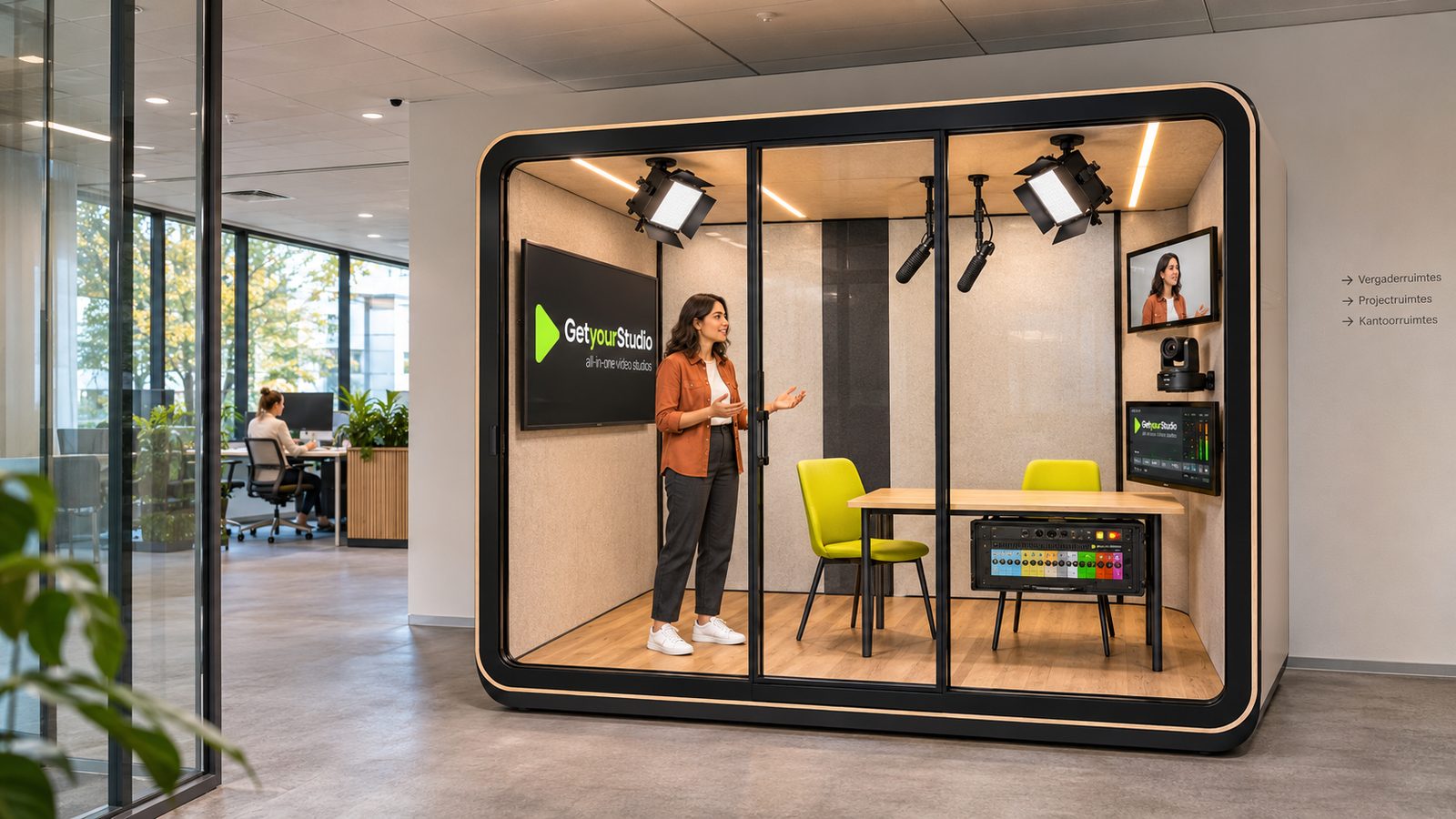
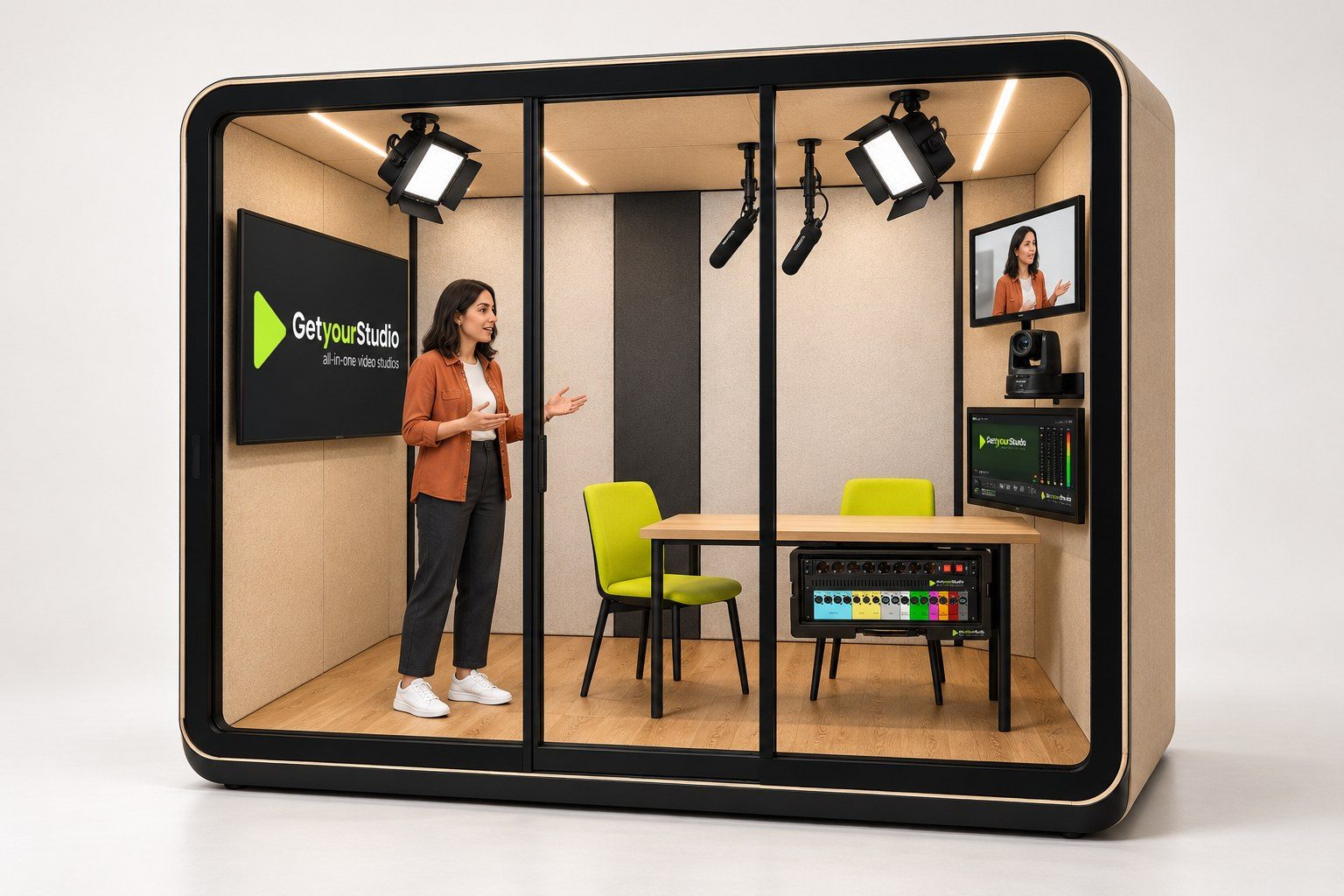
StudioCube COMPACT with a presenter by the screen

StudioCube COMPACT

1 to 2 people

Explainer videos, instructional videos and presentations

For a presenter who records standing up, with PowerPoint and video on screen. Designed for the lecturer or employee who wants to record a clip quickly and independently.
  • Standing recordings
  • 1 Canon PTZ camera
  • 202 × 200 × 230 cm
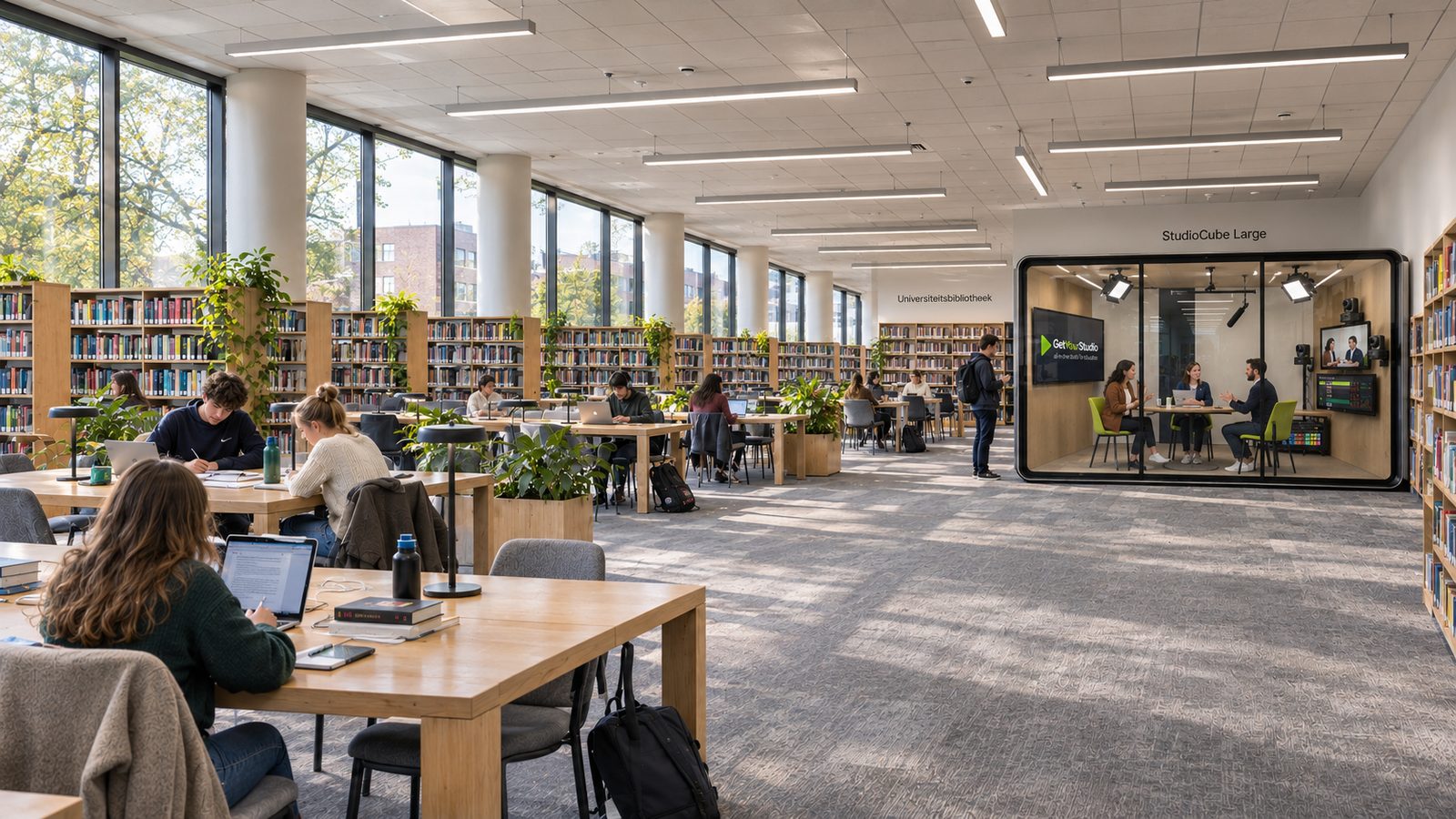
StudioCube LARGE with three people at a table

StudioCube LARGE

up to 4 people

Everything in the COMPACT, plus podcasts and interviews

With a table for seated recordings and multiple camera angles. With the AutoSwitch module, StudioAssist automatically switches to the camera of whoever is speaking, so you can record a podcast without a director.

  • Standing and seated
  • 3 Canon PTZ cameras
  • 278 × 270 × 230 cm
  • AutoSwitch

In practice

One studio for all the video your organisation makes

From an explainer clip in the library to a management update in the office. The StudioCube stands where the people who make the videos are.

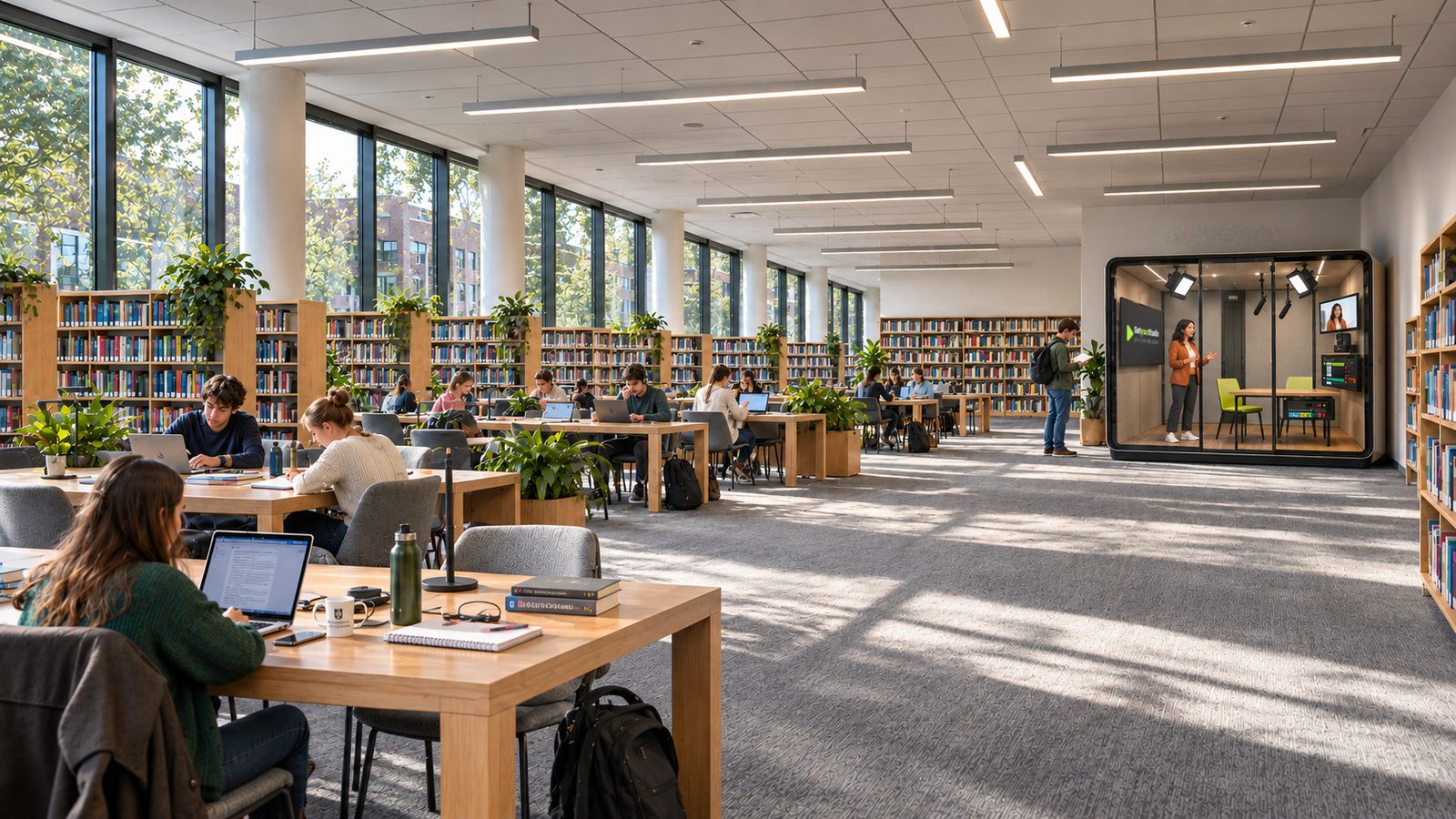
StudioCube in a university library, with a lecturer recording an explainer clip

Education, explainer clips in the library

Lecturers and students record a clip between lectures, right where they already are.

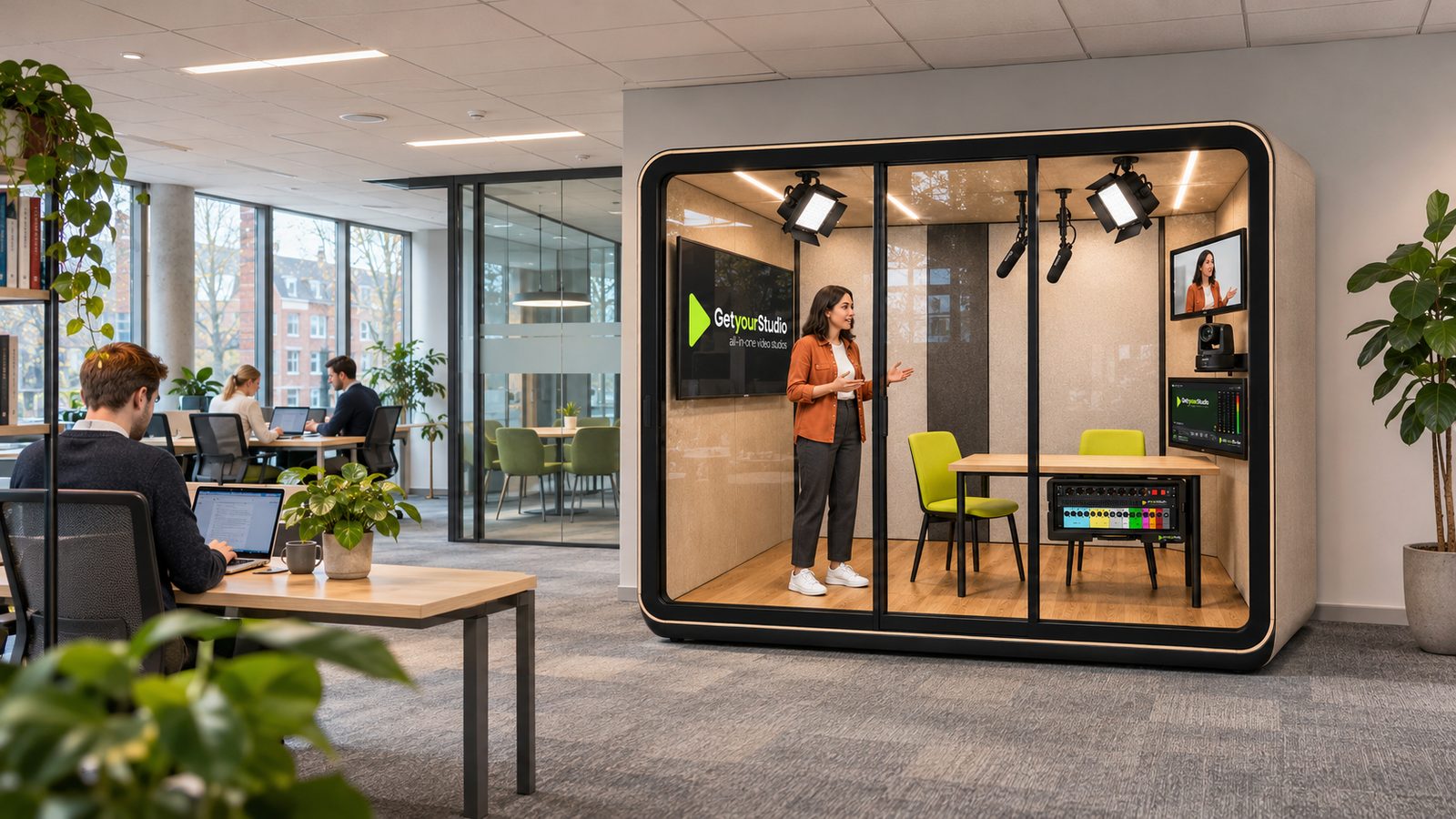
StudioCube on an open-plan office floor, with an employee recording a video

Corporate, onboarding and management updates

HR, L&D and internal communications make their own videos, without a production agency.

StudioCube in the entrance hall of an office building

Government, instructional videos for staff and citizens

Recorded and stored within your own IT environment, without third parties.

StudioCube LARGE in a library, with three people at a table for a video podcast

Video podcast and interview

Three cameras and AutoSwitch, without a director and without editing afterwards.

All applications by format

Almost everything works in both formats. For conversations at a table with multiple cameras, choose the LARGE.

In both formats

Explainer videos

A short explanation of one topic, with slides and video on screen.

  • COMPACT
  • LARGE

Instructional videos

Step-by-step explanations of how a process, system or task works.

  • COMPACT
  • LARGE

Presentations

Record a full presentation, switching between camera and PowerPoint.

  • COMPACT
  • LARGE

Webinars and livestreams

Broadcast live to YouTube, Microsoft Teams or Zoom.

  • COMPACT
  • LARGE

Onboarding

Welcome videos and introductions for new employees or students.

  • COMPACT
  • LARGE

Management updates

Quarterly updates and internal messages from the board or management.

  • COMPACT
  • LARGE

Pitches

Students and teams practise and record their pitch professionally.

  • COMPACT
  • LARGE

Product demos

Show a product or software, with the screen next to the presenter.

  • COMPACT
  • LARGE

Social media clips

Short clips for LinkedIn, the intranet or the organisation's website.

  • COMPACT
  • LARGE

LARGE only

Podcasts

Audio conversations with professional microphones, ready to publish.

  • LARGE only

Video podcasts

A conversation at a table with multiple camera angles, without editing afterwards.

  • LARGE only

Interviews

One-to-one conversations with an expert, guest or colleague.

  • LARGE only
Which format suits your application? Book a demo Download the factsheet

StudioAssist

Software that takes over the technology

StudioAssist is GetyourStudio's own software. It controls the cameras, picture, sound, recording and upload, so nobody needs to operate the technology during a recording. The user sees a few large buttons and a clear script.

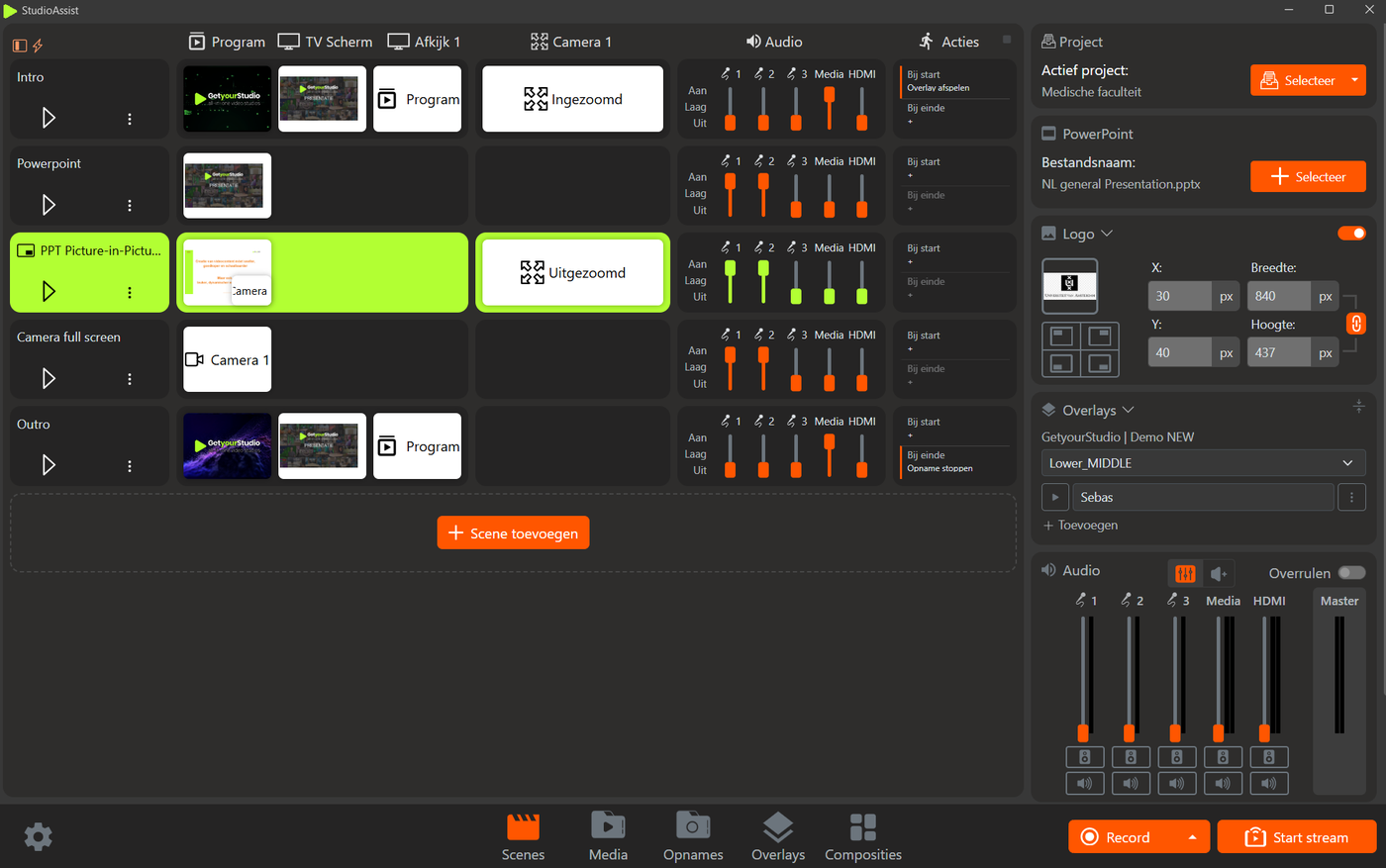
StudioAssist in director mode, with scenes, logo, overlays and audio

Mode 1, the director

Prepare the script

A media coordinator or lecturer builds a template in advance, with the scenes, the right camera shot, the logo, the lower thirds and the sound. Set it up once, then everyone works with the same setup, in the organisation's house style.

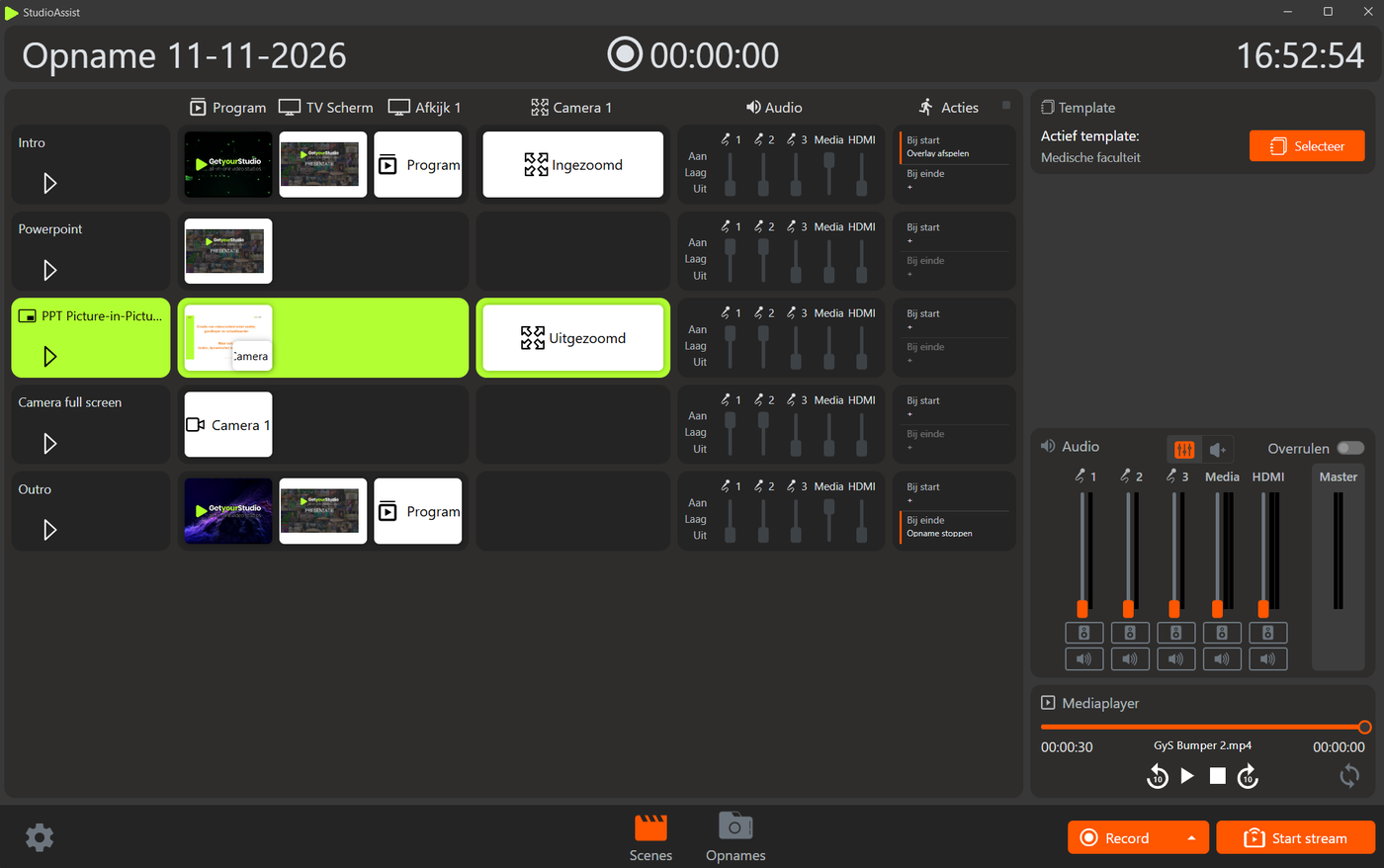
Mode 2, the presenter

Walk in and start

The presenter only sees the ready-made script. Choose your presentation, enter your name and job title, and start. While presenting, you decide what appears on screen. Once approved, the video is saved to your own location automatically.

StudioAssist in kiosk mode, with only the script and the record button

Overlays in your own house style

Name and title bars appear on screen automatically, in the organisation's house style.

PowerPoint mode

StudioAssist imports the PowerPoint and uses it to build the entire recording.

Compositions

Picture-in-picture, side-by-side and chroma key, as ready-made scenes in the script.

Fully automated script

Scenes, overlays and media change by themselves, for example as soon as a video has finished.

Recording and livestreaming

Record in Full HD, or broadcast live to YouTube, Microsoft Teams or Zoom.

AutoSwitch MODULE

In the LARGE, StudioAssist automatically switches to the camera of whoever is speaking.

Want to try StudioAssist yourself? Book a demo

Security and IT

Your recordings stay within your own organisation

No cloud and no storage at GetyourStudio. The StudioCube runs entirely within your own IT environment, so IT, security and privacy teams can sign off quickly.

Kiwa ISO 27001:2022 ISO 27001:2022 certified

Storage in your own domain

Recordings and streams are not stored in a cloud or at GetyourStudio.

Automatically deleted

Afterwards, the recording is in the user's folder and is removed from the studio system.

Straight to your platform

Automatic upload to Panopto, Kaltura or your LMS. No need to forward files manually.

Fits your IT management

Log in with your own Windows account, can be enrolled in Intune or Defender. Building in your own domain PC is also possible.

Request network documentation View the technical specifications

Who it's for

For organisations that share a lot of knowledge

Education

Lecturers and students independently create explainer clips and presentations that go straight into Panopto or Kaltura.

  • No media team needed
  • In the institution's house style
  • Also for vocational colleges and training centres

Corporates

L&D, HR, internal communications and marketing create their own onboarding, training, management updates and video podcasts.

  • No production agency
  • Onboarding and training
  • Video podcasts

Government

Instructional videos for staff and citizens, with storage in your own IT environment and automatic deletion.

  • Storage in your own IT environment
  • Automatic deletion
  • Independent of third parties

Making video without technical knowledge starts with a demo

What's inside

Five components, one complete studio

The StudioCube combines the studio space, the studio technology, professional studio hardware, GetyourStudio's software and remote support. Everything is assembled and tested in advance, so the studio works straight away on site.

Animation: the StudioCube is built from the Cube, Studio-in-a-Box, studio hardware and StudioAssistReady to record

The StudioCube, all in one

Five components, assembled and tested in advance by GetyourStudio. On site, the studio only needs to be placed and connected. After that: walk in, record, done.

  • FormatCOMPACT for 1 to 2 people, LARGE for up to 4 people
  • Installationwithin one day, only power and network needed
  • Acousticssound-dampening, also for an open-plan office or library
  • Hardwarecomplete, from cameras and microphones to lighting and screens
  • SoftwareStudioAssist included, recording and livestreaming
  • Back wall55" or 65" LED screen or printed backdrop
  • Colourscube and interior of your choice
  • Flexiblecan be dismantled and moved if you relocate
  • Servicetraining and Remote Support included, also available to lease
1

The Cube

The studio space itself. Acoustically sealed with a glass front, so it can stand on an open-plan office floor or in a library.

  • COMPACT
  • LARGE
  • Glass front
  • Acoustic
2

Studio-in-a-Box

The technical heart. Direction, picture and sound in one preconfigured unit with colour-coded connections.

  • Full HD recording
  • Livestream
  • Plug-and-play
3

Professional studio hardware

Everything mounted and adjusted in advance, so picture, lighting and sound are right from the start.

  • Canon PTZ cameras
  • Shure directional microphones
  • Studio lighting
  • Sit-stand desk
  • Screens
4

StudioAssist

GetyourStudio's own software. Everyone records independently, without technical knowledge and without post-production.

  • Templates
  • Automated directing
  • Automatic lower thirds
  • User levels
5

Remote Support

Our support team looks in remotely and solves problems, without anyone needing to visit.

  • Part of the SLA
  • Three SLA levels
  • Remote assistance

Delivery and service

Installed, set up and supported

Installation in one day

Our technicians assemble, configure and test all equipment in advance. No building work is needed.

Training and support

An introductory training session is included. Remote Support is part of the SLA, at three levels.

Buy or lease

Always including installation, training, software and Remote Support. If you move, the cube can be dismantled and rebuilt elsewhere.

Colour of the cube and interior of your choice. Back wall as a 55" or 65" LED screen or as a printed backdrop.

Technology

Technical specifications

All specifications per format. For an IT or security review, full network documentation is available, including a network diagram, port overview and technical FAQ.

Download the factsheet Request network documentation
View all specifications
ComponentCOMPACTLARGE
Design
People1 to 2up to 4
Recording typestandingstanding and seated at a table
External dimensions (w × d × h)202 × 200 × 230 cm278 × 270 × 230 cm
Weight, approximateapprox. 680 kg, including equipmentapprox. 770 kg, including equipment
Cameras1 Canon CR-N100 PTZ3 Canon CR-N100 PTZ
Microphones2 Shure MX202B overhead2 Shure MX202B overhead
Microphone inputs2 XLR6 XLR
LED studio panels24
Screen or back wall55" or 65" LED screen, or a printed back wall in any design
Furnitureheight-adjustable deskdesk plus table for seated recordings
Studio-in-a-Box, recording and streaming
Studio-in-a-BoxBlackmagic Design ATEM Mini Extreme ISO G2, HP mini PC with Windows 11 and StudioAssist, own internal network, preconfigured in one unit
AudioEQ, compressor, gate and limiter, preset by GetyourStudio
RecordingFull HD 1080p in MP4, available in the user's folder or a central directory straight after recording
PlatformsAutomatic upload to Panopto, Kaltura or an LMS
LivestreamVia RTMP to YouTube, Microsoft Teams, Zoom and more
Network and IT
ConnectionsPower and one network connection (RJ45), no Wi-Fi needed
BandwidthMinimum 10 Mbit/s upload and 50 Mbit/s download for streaming
Network trafficOutbound only, works behind a corporate proxy
Studio PCCan be enrolled in Intune or Defender, BitLocker encryption possible, building in your own domain PC is also possible
LoginWith the user's own Windows account
Cube
DesignAcoustic, glass front, lockable with a key, colour of the cube and interior of your choice
SecurityPrepared for connection to ventilation and fire alarm systems

FAQ

Frequently asked questions about the StudioCube

Purchase, lease and installation

What does a StudioCube cost?

The price depends on the format, the finish of the back wall and interior, and whether you buy or lease. Installation, training, StudioAssist and Remote Support are always included. After a conversation or demo, you receive a tailored quotation.

Can I lease the StudioCube?

Yes. You can buy or lease the StudioCube. In both cases, installation, training, software and Remote Support are included.

How quickly is the StudioCube ready to use?

Our technicians assemble, configure and test all equipment in advance. On site, we install the cube within a day, without building work. After the introductory training, you can start recording straight away.

Can I get a demo?

Yes, online or in our demo studio in Utrecht. You'll see how StudioAssist works and how a recording runs, from template to video in your own folder.

Use and training

Do I need technical knowledge?

No. The presenter chooses a template, starts the recording with one click and approves the video afterwards. StudioAssist handles the cameras, picture, sound, recording and upload. No technician needs to be present.

What is the difference between the COMPACT and the LARGE?

The COMPACT is designed for 1 to 2 people recording standing up, for example explainer videos, instructional videos and presentations, and has one Canon PTZ camera. The LARGE accommodates up to 4 people, has three cameras and a table for seated recordings. It also lets you record podcasts, video podcasts and interviews.

Who sets up the recordings and the house style?

A media coordinator, lecturer or communications officer creates templates in StudioAssist in advance, with the scenes, the camera shot, the logo, the name and title bars and the sound. Presenters then only work with those templates, so every video is in the organisation's house style.

Is training and support available?

An introductory training session is included with delivery. After that, our support team helps via Remote Support: we look in remotely and solve problems without anyone needing to visit. Remote Support is part of the SLA, at three levels.

IT, privacy and security

Are recordings stored in the cloud?

No. Recordings and streams are not stored in a cloud or at GetyourStudio. Afterwards, the video is in the user's folder or in a central directory within your own domain, and it is removed from the studio system.

Can the StudioCube upload to Panopto or Kaltura?

Yes. Recordings go to Panopto, Kaltura or your LMS automatically. No need to forward files manually.

What does the StudioCube require from our network and IT management?

One wired network connection (RJ45) is enough, Wi-Fi is not needed. The system uses outbound traffic only and works behind a corporate proxy. Livestreaming requires at least 10 Mbit/s upload and 50 Mbit/s download. The studio PC runs Windows 11, users log in with their own Windows account, and your IT department can enrol the PC in Intune or Defender. Having your own domain PC built in is also possible.

Is GetyourStudio ISO 27001 certified?

Yes. GetyourStudio is ISO 27001:2022 certified by Kiwa, covering hardware delivery, software development, sales and support. For an IT or security review, we send you the network documentation, including a network diagram, port overview and technical FAQ.

Space and building

How much space does the StudioCube need?

The COMPACT measures 202 × 200 × 230 cm, the LARGE 278 × 270 × 230 cm (width × depth × height). Including equipment, the COMPACT weighs approximately 680 kg and the LARGE approximately 770 kg. If in doubt, check the floor's load-bearing capacity with your facilities team.

What is needed on site?

Just a power connection and a network connection. The cube is acoustically sealed, so it can also stand on an open-plan office floor or in a library. It is prepared for connection to ventilation and fire alarm systems, and lockable with a key.

Can the StudioCube be moved?

Yes. The cube can be dismantled and rebuilt elsewhere if you move.

Want to see how it works? Book a demo.

Online or in our demo studio in Utrecht, we show you how the StudioCube and StudioAssist work in practice.

GetyourStudio Computerweg 22, 3542 DR Utrecht, the Netherlands +31 850 438430