Record videopodcasts or webinars without a crew, completely automatically.
That's AutoSwitch.

Fully automated camera control.
Broadcast quality, without technical knowledge.

  • No camera crew or director required
  • Automatically switches between multiple speakers and cameras
  • Works with every GetyourStudio system
  • Suitable for webinars, talk shows and videopodcasts
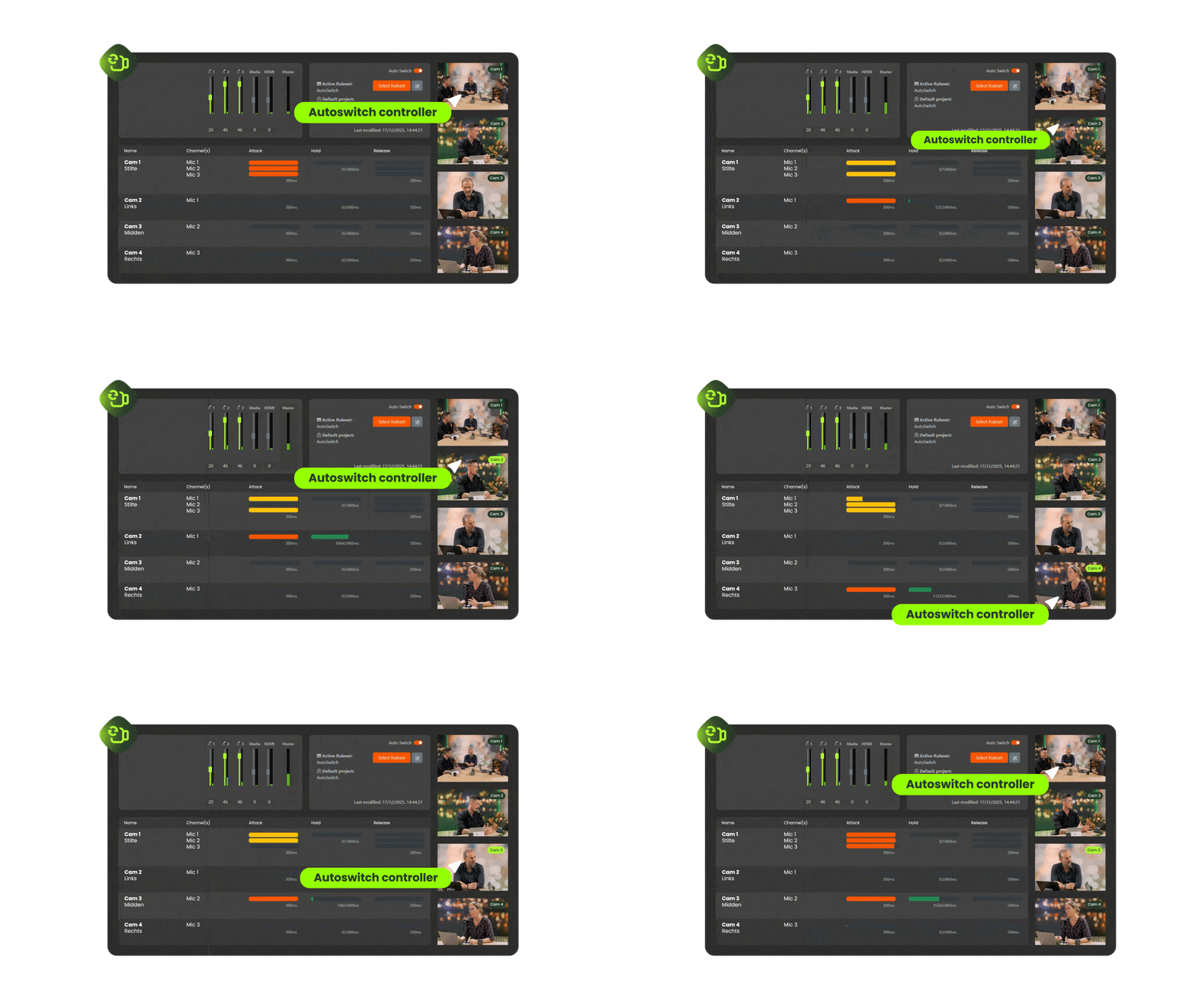
AutoSwitch in actie – automatisch schakelen tussen camera's

Why is making video still so complicated?

Multiple speakers, multiple cameras — normally that requires a director. AutoSwitch handles it automatically. The software detects who is speaking and instantly directs the right camera.

Without AutoSwitch
  • At least 2–3 people per recording
  • Manual switching between cameras
  • High staffing and production costs
  • Technical setup required for every session
  • Missed cuts and wrong camera angles
With AutoSwitch
  • No staff required — fully automated
  • Automatic, based on who is speaking
  • Fixed bundle, no variable costs
  • Set up once, always ready to record
  • Always the right camera at the right moment

How it works:

No buttons. No crew. No stress. Your studio works fully automatically in three simple steps.

Start your recording

AutoSwitch detects who is speaking and activates the right camera.

Set up in advance which camera belongs to which speaker. Once the recording starts, AutoSwitch takes care of the rest.

Automatic switching

Cameras switch and follow in real time — as if a director is present.

Nobody speaking? AutoSwitch automatically cuts to a wide shot with everyone in frame.

Ready to publish

The output is directly exportable for YouTube, Microsoft Teams, intranet, LMS or social media.

Want to edit further? The raw video and audio files remain available.

Vodcast: see AutoSwitch in action.

Pay for software. Not for a production team.

AutoSwitch replaces the role of camera operator and director in every recording. No variable staffing costs — AutoSwitch works on a bundle basis, you only pay for what you record.

AutoSwitch module logo – onderdeel van StudioAssist

Easy to expand.

AutoSwitch is one module of StudioAssist. Each module adds a new layer of automation, so the studio can handle more and more — without additional staff or technical knowledge. Discover which combination suits the organisation.

AutoSwitch

The digital director


Automatically switches based on speech.


Works with multiple speakers and cameras.


No camera crew or director required.


Suitable for webinars, talk shows and videopodcasts.


Set up once, always ready to record.
SmartOverlays

Professional graphics, live on screen.


Add logos, titles and graphics without post-production.


Choose from 150+ ready-made templates.


Always on-brand, for every format.


No graphic design skills required.


Applicable directly during the recording.
AutoCaption

Automatic subtitling.


Subtitles generated directly in the video.


Available in multiple languages.


Increases reach and accessibility.


No manual editing required.


Works automatically based on speech recognition.
WirelessShare

Wireless presenting.


Share your screen wirelessly from laptop, tablet or phone.


Compatible with all common operating systems.


No cables, no delay.


Connect with one click.


Ideal for multiple presenters.
GreenScreen

Virtual backgrounds.


High-quality green screen effect in one click.


Quickly switch background per format or brand identity.


Ideal for multiple departments or faculties.


No technical knowledge required.


Ready to record immediately.

No obligations. Scheduled within 24 hours.


Frequently asked questions about AutoSwitch

Everything about automated camera control — from how AutoSwitch works to compatibility, bundles and combining it with other StudioAssist modules.

  • 1. What is AutoSwitch and what exactly does it do?

    AutoSwitch is a software module of StudioAssist that automatically switches between studio cameras based on who is speaking. The module combines microphone input with the scene structure entered in advance in StudioAssist. Once a recording starts, AutoSwitch detects which speaker has the floor and activates the corresponding camera — in real time, without anyone pressing a button. Nobody speaking? AutoSwitch automatically switches to a wide shot with everyone in frame.

  • 2. Does AutoSwitch require a camera crew or director?

    No. AutoSwitch fully replaces the role of the director. The module automatically detects who is speaking and selects the appropriate camera accordingly. One person can run the entire recording — from preparation to export-ready output — without technical knowledge or staff behind the scenes.

  • 3. Is AutoSwitch suitable for live broadcasts?

    AutoSwitch is designed for studio recordings, not for live broadcasts. The software controls cameras based on speech and scene structure — ideal for recordings that are subsequently published via YouTube, Microsoft Teams, intranet, LMS or social media.

  • 4. Which production formats is AutoSwitch suitable for?

    AutoSwitch is designed for multiple formats: videopodcasts, webinars, panel discussions, talk shows and board updates. The scene settings are adjustable per format, allowing the same studio to be used for very different production types — without additional technical preparation per session.

  • 5. Does AutoSwitch work with all GetyourStudio models?

    Yes. AutoSwitch is a module of StudioAssist and works with every GetyourStudio studio setup — from the BASIC to the PRO 4K and ENTERPRISE. The module is designed to work seamlessly with the Canon PTZ cameras and hardware included as standard in all models.

  • 6. Can I edit the footage after recording?

    Yes. The output from AutoSwitch is directly exportable for YouTube, Microsoft Teams, intranet, LMS or social media. Want more control over the final result? The raw video and audio files remain available for editing in an external editor. With the PRO XL ISO, all individual camera feeds are additionally recorded separately as an ISO stream, giving maximum freedom in post-production.

  • 7. Can AutoSwitch be used standalone, without a GetyourStudio studio?

    AutoSwitch is a module of StudioAssist and works in combination with a GetyourStudio studio setup. Please get in touch to discuss the possibilities for a specific situation.

  • 8. What does AutoSwitch cost?

    AutoSwitch is available as a bundle at a GetyourStudio studio. You only pay for what you record — no fixed monthly costs. Contact us for a tailored quote or schedule a no-obligation demo.

Deze bedrijven werken al met GetyourStudio