For every application, a turnkey video studio
All-inclusive and operational within days. Completely hassle-free.
Includes StudioAssist, intelligent videosoftware that enables users without AV expertise to create stunning and dynamic content.

GetyourStudio
BASIC
Complete solution for webinars, e-learning, knowledge sharing, training sessions or presentations
Comes with 2 premium Canon PTZ cameras and 2 Shure microphones (expandable up to 3 cameras and 2 microphones).
Includes professional studio lighting, 2 microphones, camera tripods with confidence monitors, 15-button control panel, 2 monitors and much more.
Includes Studio-in-a-Box BASIC: a compact, mobile all-in-one solution with integrated PC, 12-channel audio mixer and professional video mixer — ready to expand effortlessly to 3 cameras, 2 microphones and 8 sources.
Seamlessly streams via WebRTC to platforms like Zoom, Teams, Google Meet, GoToWebinar, Webex, YouTube Live, Vimeo or Facebook Live.
Powered by StudioAssist, the automated control software from GetyourStudio.

GetyourStudio
PRO
Ideal for webinars, interviews, lounge/talk show setups, quarterly meetings, training sessions and more.
Includes 2 to 4 premium Canon PTZ cameras and 3 Shure microphones (expandable to 4 cameras and 6 microphones).
Professional studio lighting, 3 Shure microphones, mobile Manfrotto video tripods with confidence monitors, 15-button one-touch control panel and more included.
Includes Studio-in-a-Box PRO: compact mobile all-in-one solution with Blackmagic Design 1 M/E video mixer, 12-channel audio mixer and integrated PC, easily expandable to 4 cameras, 6 microphones and 10 sources.
Supports streaming via RTMP or SRT to Zoom, Teams, Google Meet, GoToWebinar, Webex, YouTube Live, Vimeo or Facebook Live.
Powered by StudioAssist, the automated video control software from GetyourStudio.

GetyourStudio
PRO XL
Perfect for larger events like webinars, talk shows, quarterly updates, training sessions and corporate presentations.
Includes 2–6 premium Canon PTZ cameras and 4 microphones (expandable to 6 cameras and 8 microphones).
Comes with extensive professional studio lighting, autocue/teleprompter, wireless and wired microphones, mobile Manfrotto tripods with confidence monitors, 15-button control panel and much more.
Includes Studio-in-a-Box PRO XL: compact mobile all-in-one solution with Blackmagic Design 2 M/E video mixer, integrated recorder and streamer, 18-channel audio mixer and industrial Windows PC, easily expandable to 6 cameras, 8 microphones and 20 sources.
Streaming supported via RTMP or SRT to Zoom, Teams, Google Meet, GoToWebinar, Webex, YouTube Live, Vimeo or Facebook Live.
Powered by StudioAssist, the automated control software from GetyourStudio.
GetyourStudio
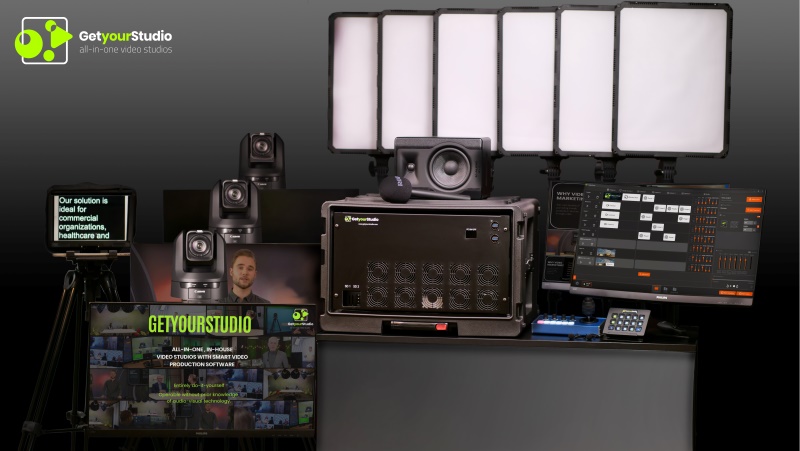
PRO 4K
All equipment and components operate in high-end 4K 12G SDI quality.
Includes Studio-in-a-Box PRO 4K: compact mobile all-in-one solution with Blackmagic Design 4K 12G-SDI 1 M/E video mixer, 12-channel audio mixer and integrated PC, easily expandable to 4 cameras, 6 microphones and 10 sources.
Powered by StudioAssist, the automated control software from GetyourStudio.
GetyourStudio
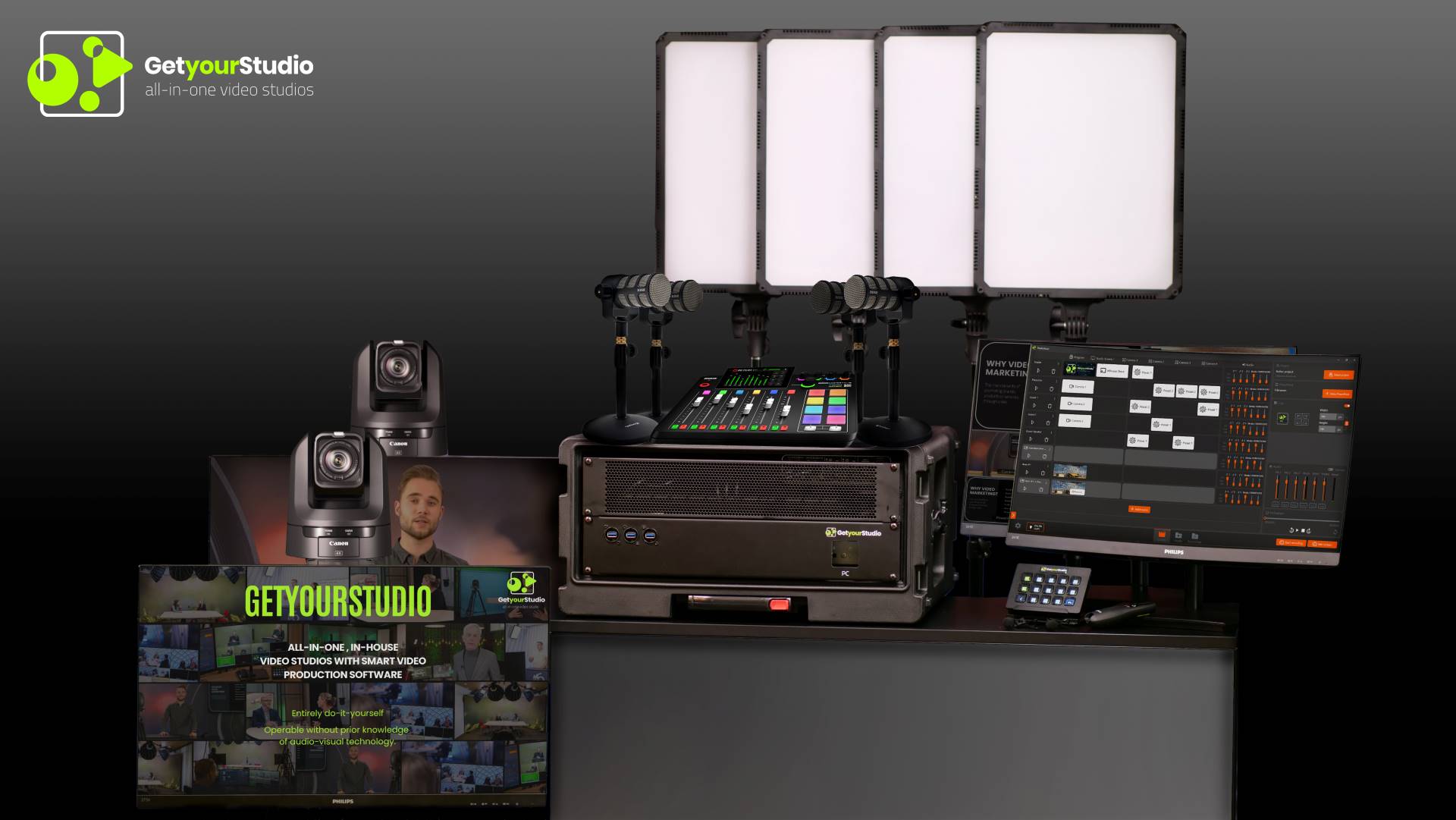
VIDEOPODCASTER
Complete system for creating professional podcasts and video content
Complete 4-person Rode Podcaster PRO II setup plus GetyourStudio BASIC with 2 high-quality Canon PTZ cameras
Powered by StudioAssist, the automated control software from GetyourStudio.
GetyourStudio
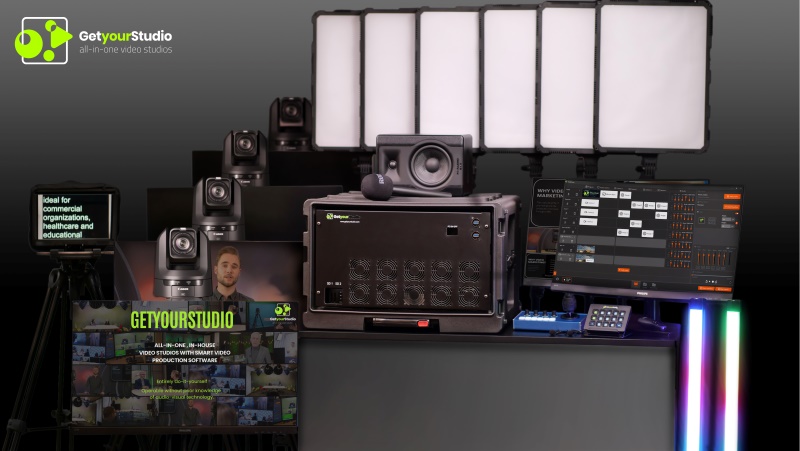
ENTERPRISE
Our most flexible solution without major investments or complex installations.
Preassembled and proven components from the GetyourStudio portfolio.
Powered by StudioAssist, the automated control software from GetyourStudio.
Compare product features
| BASIC | PRO | PRO XL | PRO 4K | |
|---|---|---|---|---|
| Cameras & image quality | ||||
| Max. number of cameras that can be connectedThe maximum number of cameras that can technically be connected to the studio. | 3 | 4 | 6 | 6 |
| Total number of cameras includedHow many PTZ cameras are included as standard with the package. More cameras are possible. | 1 to 3 | 1 to 4 | 1 to 6 | 1 to 6 |
| Recording and streaming resolutionThe resolution determines, among other things, the image quality of the recording or livestream. | Full HD | Full HD | Full HD | UHD / 4K |
| Can I record separate tracks per camera? (ISO recording)In addition to the combined video stream, the separate footage from each camera is also recorded individually, useful for post-production. | − | Optional | Optional | Optional |
| Audio & microphones | ||||
| Max. number of microphones that can be connectedThe maximum number of microphones that can technically be connected to the studio. | 2 | 6 | 8 | 8 |
| Total number of microphones includedHow many microphones are included as standard with the package. More microphones are possible. | 1 to 2 | 1 to 6 | 1 to 8 | 1 to 8 |
| Basic audio mix optionsFor example noise gate, basic equaliser and solo, for clear and intelligible sound. | ✓ | ✓ | ✓ | ✓ |
| Advanced audio mix optionsNoise gate, equaliser, solo, limiter, effects, compressor and more, for extra control with multiple speakers or more complex recordings. | − | ✓ | ✓ | ✓ |
| Studio lighting | ||||
| Number of studio lights includedHow many lights are included as standard with the package. Extra lights are possible. | Standard 3, extra lights possible | Standard 4, extra lights possible | Standard 6, extra lights possible | Standard 6, extra lights possible |
| RGB / coloured lightingAdjust the colour of the light in the studio, for example for atmosphere or to match brand colours. | Optional | Optional | Optional | Optional |
| DMX control optionsControl the studio lighting remotely and recall preset light scenes via a DMX control panel. | Optional | Optional | Optional | Optional |
| Screens & teleprompter | ||||
| Studio screen / background TV or look-back monitorsMax. number of screens, for example for presentations, background image/decor, or a screen positioned under the camera so the presenter keeps looking straight into the camera. | 1 | 5 | 7 | 7 |
| Teleprompter / autocue included or possibleText that scrolls on a screen next to the camera, so the presenter doesn't need to memorise anything and still looks straight into the camera. | Optional | Optional | Optional | Optional |
| Software & content features | ||||
| Can I share my phone or tablet live? (casting)The phone or tablet then becomes an extra source, for example to FaceTime/video call live or share a screen during the broadcast. | Wireless Share moduleStudioAssist Advanced | Wireless Share moduleStudioAssist Advanced | Wireless Share moduleStudioAssist Advanced | Wireless Share moduleStudioAssist Advanced |
| Can I create a Picture-in-Picture scene?With Picture-in-Picture (PiP) you show two video images at the same time, for example a speaker in a small window over a presentation or video. | ✓ | ✓ | ✓ | ✓ |
| Can I create compositions?Combine multiple video sources, images, text and graphic elements into one layout to form a single complete image, for example two camera shots side by side. | Basic compositions | Basic compositions | Advanced compositions | Advanced compositions |
| Can I display title/name bars and other graphic overlays?Very useful for talk-show-style settings or whenever multiple speakers are on screen at the same time. | Overlays moduleStudioAssist Extended | Overlays moduleStudioAssist Extended | Overlays moduleStudioAssist Extended | Overlays moduleStudioAssist Extended |
| Green screen / chromakey software integrationThis lets you use a green screen and create virtual presentations or backgrounds. | Chromakey moduleStudioAssist Advanced | Chromakey moduleStudioAssist Advanced | Chromakey moduleStudioAssist Advanced | Chromakey moduleStudioAssist Advanced |
| Automatic camera switching (AutoSwitch)The studio automatically switches to the camera of whoever is speaking at that moment, without anyone having to switch manually. | AutoSwitch modulestandalone module, or standard in StudioAssist Extended | AutoSwitch modulestandalone module, or standard in StudioAssist Extended | AutoSwitch modulestandalone module, or standard in StudioAssist Extended | AutoSwitch modulestandalone module, or standard in StudioAssist Extended |
| Can I 'call in' a guest speaker via Teams or Zoom and show them directly in my broadcast or recording?The guest speaker then appears live on screen alongside the presenter, without having to be physically present in the studio. | ✓ | ✓ | ✓ | ✓ |
| Maximum number of external HDMI connectionsTo connect external laptops directly to the studio, for example for a guest's presentation. | 1 | 1 to 2 | 2 to 3 | 2 to 3 |
Curious about the possibilities for your organisation?
Then please contact us or book an online demo
Frequently asked questions about GetyourStudio models
Everything about choosing the right studio model — from the differences between BASIC and PRO to key specs, pricing, scalability and what's included as standard.
-
1. How many models are there and what are the differences?
GetyourStudio offers six configurations: BASIC, PRO, PRO XL, PRO XL ISO, PRO 4K and Enterprise. The main differences lie in the number of cameras, the capacity of the video mixer, the number of sources and scalability options. The BASIC is a complete 2-camera studio. The PRO supports up to 4 cameras. The PRO XL scales to 6 cameras and includes a 2 M/E video mixer. The PRO XL ISO adds ISO recording per camera feed. The PRO 4K delivers everything in 12G SDI 4K 60fps quality. The Enterprise is a fully custom studio solution. Every model is available in multiple camera configurations and can be expanded beyond the standard package with options such as extra microphones, teleprompters, studio furniture, decor and screens.
-
2. What is the Studio-in-a-Box and why is it the heart of every model?
The Studio-in-a-Box is the core of every GetyourStudio studio: a compact, mobile flightcase containing all the AV technology needed to run a full multicamera production — video mixer, audio mixer, integrated PC, recorder, streamer and StudioAssist software. Everything is pre-assembled, tested and colour-coded for effortless setup on location. The Studio-in-a-Box is the engine that powers the entire studio. Each model has its own Studio-in-a-Box variant: the BASIC runs on a 12-channel audio mixer and a professional video mixer; the PRO and PRO XL use Blackmagic Design 1 M/E and 2 M/E video mixers respectively; the PRO 4K uses a Blackmagic Design 4K 12G-SDI 2 M/E video mixer.
-
3. Why does the number of sources matter?
The number of sources determines how many different video signals can be connected to the mixer simultaneously — including cameras, laptops, tablets, smartphones, video players, remote guests via Teams or Zoom, and more. The more sources available, the more dynamic and flexible your productions can be. The BASIC supports up to 8 sources. The PRO supports up to 10 sources. The PRO XL and PRO XL ISO support up to 20 sources, enabling complex multicamera setups with multiple presenters, remote speakers and media sources running simultaneously.
-
4. Who is the GetyourStudio BASIC best suited for?
The BASIC is the ideal entry-level choice for organisations starting out with in-house video production. The Studio-in-a-Box BASIC includes a professional video mixer and a 12-channel audio mixer, supporting up to 2 cameras, 2 microphones and 8 sources. It streams seamlessly via WebRTC to platforms like Zoom, Teams, Google Meet, GoToWebinar, Webex, YouTube Live, Vimeo and Facebook Live. The BASIC is particularly well suited for online training, e-learning, webinars, internal communications, product presentations and onboarding content — produced by a single person, without any AV expertise.
-
5. When should I choose the PRO over the BASIC?
The PRO is the natural step up when you need more cameras, more production dynamics or more simultaneous sources. The Studio-in-a-Box PRO features a Blackmagic Design 1 M/E video mixer and supports up to 4 cameras, 6 microphones and 10 sources. It streams via RTMP or SRT, offering more flexibility for advanced streaming setups. The PRO is the right choice for organisations that regularly produce interviews, talk shows, lounge sessions, quarterly all-hands meetings or hybrid events with multiple participants — and want more creative and technical headroom than the BASIC provides.
-
6. What makes the PRO XL the most versatile option?
The PRO XL is the most complete standard configuration for serious multicamera productions. The Studio-in-a-Box PRO XL features a Blackmagic Design 2 M/E video mixer, an 18-channel audio mixer and an industrial Windows PC — supporting up to 6 cameras, 8 microphones and 20 sources. Standard equipment includes an autocue/teleprompter, rolling Manfrotto tripods with confidence monitors and advanced professional studio lighting. Streaming via RTMP or SRT. The PRO XL is the go-to choice for larger webinars, events with multiple guest speakers, complex talk show or lounge setups, live shopping and quarterly presentations.
-
7. What does the PRO XL ISO add compared to the PRO XL?
The PRO XL ISO is identical to the PRO XL in setup, but adds ISO recording: each individual camera feed is recorded simultaneously as a separate video stream alongside the mixed programme output. This gives you maximum freedom in post-production — every camera angle can be edited, cut or repurposed independently. Ideal for organisations that want to rework their productions into e-learning modules, highlight reels or repurposed content for other platforms. The PRO XL ISO supports up to 6 cameras, 8 microphones and 20 sources, with a Blackmagic Design 2 M/E video mixer and 18-channel audio mixer. Pricing on request.
-
8. Who is the PRO 4K designed for?
The PRO 4K is the top-tier option for organisations that demand the highest possible image quality. All equipment and connections are built to 12G SDI 4K 60fps standard. The Studio-in-a-Box PRO 4K features a Blackmagic Design 4K 12G-SDI 2 M/E video mixer, supporting up to 6 cameras and 8 microphones. Suited for organisations that need ultra-high-resolution recordings for broadcasting, premium e-learning content or large-scale events where 4K output is a requirement. Pricing on request.
-
9. What is the GetyourStudio VideoPodcaster and who is it for?
The VideoPodcaster is a unique combined system: a complete podcast studio and a fully-equipped 2-camera video studio in one. It includes a complete 4-person Rode Podcaster PRO II set alongside the GetyourStudio BASIC with 2 high-quality Canon PTZ cameras. Ideal for organisations that want to produce both professional audio podcasts and video podcasts from the same setup — without having to invest in two separate systems. Powered by StudioAssist, including all smart presets and effortless operation for non-technical users.
-
10. When is the Enterprise solution the right choice?
The Enterprise is designed for organisations that need a specific configuration that falls outside the standard models — due to a unique space, a non-standard production requirement or a custom integration. It uses the same pre-assembled, proven GetyourStudio components as the standard models, but in a fully bespoke configuration. The Enterprise is also the solution for very large setups, multi-studio environments or organisations with specific broadcast requirements. Pricing and specifications on request, always preceded by an in-depth consultation with a GetyourStudio specialist.
-
11. Which Canon PTZ cameras are included per model?
GetyourStudio exclusively works with Canon PTZ cameras — the market leader in image quality, reliability and auto-tracking capability for corporate studio environments. The exact camera model depends on the studio configuration chosen. The Canon CR-N100 is included in the BASIC entry-level configuration. The Canon CR-N300 and CR-N500 are used in PRO, PRO XL and PRO 4K configurations. All Canon PTZ cameras support auto-tracking (Canon Auto Tracking Lite included as standard, Advanced auto-tracking available at extra cost) and are available per camera. Every model can be delivered in multiple camera configurations: from 2 to 6 cameras per studio.
-
12. What is included as standard in every full studio configuration?
Every full GetyourStudio studio is delivered as a turnkey, ready-to-use package. In addition to the Studio-in-a-Box, the standard package includes: Canon PTZ cameras (number and type depending on model), Nanlite studio lights with tripods, Shure lavalier microphones, Manfrotto video tripods, a high-quality loudspeaker, Philips curved monitors, Philips 27-inch confidence monitors, the OneTouch control panel, StudioAssist software (Essential, Advanced or Extended depending on model) and all cabling and accessories. Numerous expansions are available: wireless microphones, additional screens, teleprompters, studio furniture, decor and custom fit-out.
-
13. Which streaming platforms can I broadcast to?
All GetyourStudio models support livestreaming to all major platforms. The BASIC streams seamlessly via WebRTC to Zoom, Teams, Google Meet, GoToWebinar, Webex, YouTube Live, Vimeo and Facebook Live. The PRO, PRO XL, PRO XL ISO and PRO 4K also support RTMP and SRT, offering greater flexibility for advanced streaming setups and professional encoders. StudioAssist manages the connection: configure once, then go live at the touch of a button. Streaming and recording can also run simultaneously.
-
14. What are the prices of the different configurations?
The GetyourStudio BASIC starts from €15,950 — including installation, training, software and support. Pricing for the PRO, PRO XL, PRO XL ISO, PRO 4K and Enterprise configurations is available on request. All prices exclude VAT. Leasing is available for all models. GetyourStudio provides a customised quote on request.
-
15. Which StudioAssist modules are available?
StudioAssist is included with every model at one of three levels: Essential, Advanced or Extended — depending on the studio configuration. On top of that, four optional add-on modules are available: Wireless Share (use a smartphone or tablet as a wireless video source), Greenscreen Chromakey (virtual backgrounds integrated directly into StudioAssist), Overlays (live display of name bars, scores, countdowns and other graphics) and the Translation & Subtitle module (live translation and closed captions in over 35 languages). All modules activate directly from within the StudioAssist interface, without switching applications.
-
16. Can every model be used on location outside the studio?
Yes. All GetyourStudio models are designed with mobility in mind. The Studio-in-a-Box is on wheels and compact enough to transport to an external location, trade show or event venue. Thanks to the colour-coding system, the studio can be set up in minutes: every cable and device has its own colour and simply connects to the matching colour. GetyourStudio clients regularly use their studio both at their fixed location and on-site at clients, trade shows or events.
-
17. Can I start with a smaller model and scale up later?
Scaling within a model is straightforward: the BASIC grows to a maximum of 2 cameras and 2 microphones, the PRO to 4 cameras and 6 microphones, the PRO XL to 6 cameras and 8 microphones. Upgrading from a BASIC to a PRO or PRO XL requires a different Studio-in-a-Box unit. In practice, organisations that grow quickly are better off choosing the PRO or PRO XL from the start. GetyourStudio always advises based on expected production volume, format and growth ambitions — to ensure you choose the right model from day one.
-
18. Can I lease a model instead of buying it?
Yes, leasing is available for all models. The monthly lease payment depends on the chosen configuration and lease term, and is typically calculated over 60 months. Leasing a studio makes financial sense for many organisations: the savings on external production costs or hiring video production companies typically exceed the monthly lease payment within the first year. GetyourStudio provides a personalised lease calculation on request.
-
19. How long does installation take and when am I up and running?
Thanks to the pre-assembled and tested components, technical installation is typically completed within a day. Installation is followed by training of super-users and team members, after which the team can produce independently straight away. A studio without custom decor or fit-out is generally fully operational within a few days of installation. More extensive setups involving custom decor, integrated screens or large-scale team training may take a little longer. GetyourStudio handles the complete end-to-end process — from planning through to your first live broadcast.
-
20. How do I find the right model for my organisation?
GetyourStudio always offers a no-obligation consultation. During this conversation, a specialist discusses your production needs, desired content formats, location, team and budget — and advises on which model and configuration best fits your situation. This is followed by a tailored quote, optionally supplemented by a 3D studio design and a live demo at one of GetyourStudio's reference studios. Schedule a demo or get in touch via the contact page to start the conversation.

