


ALL IN ONE
GetyourStudio BASIC is our most affordable turnkey, all-in-one studio. GetyourStudio BASIC contains all the necessary equipment to easily create live streams or video content at the level of a professional studio in no time. Everything in-house, at your location, fully coordinated, without the help of technicians.
High-quality Canon PTZ cameras, powerful adjustable LED panel lamps, microphones, (comfort) screens, and all equipment to be able to switch smoothly and quickly between different sources, to optimally tune the sound to record or live stream.


READY-TO-USE SOLUTION
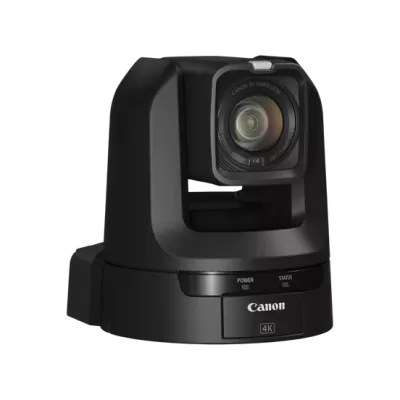
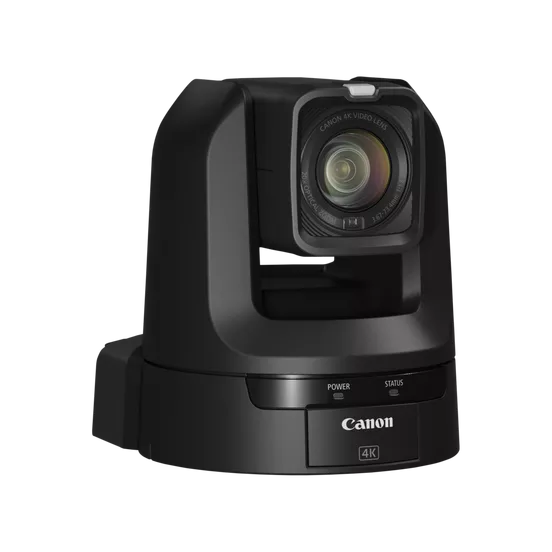
GetyourStudio BASIC comes equipped two high-quality Canon PTZ (Pan Tilt Zoom) cameras, with 20x optical zoom. GetyourStudio BASIC is a ready-to-use, all-in-one solution with all the necessary equipment included to record or stream with multiple cameras.
EVERYTHING INCLUDED
Everything is included, from high-quality bi-color LED studio lamps with tripods, professional lavalier microphones, different monitors for operating the software or the multi-viewer. In addition, a 27-inch look-back monitor is mounted under each camera. The look-back monitor can be used to see yourself on the screen while presenting and still look straight into the camera. You can also show the Teams or Zoom participants during the live stream, or you can use it to see your speaker notes.


COMPACT
At the heart of GetyourStudio BASIC is the compact, mobile Studio-in-a-Box BASIC. This wheeled flight case contains all essential control and recording equipment – fully integrated and ready to deploy on location. Includes an audio mixer, video mixer, and intelligent automation via the StudioAssist software. Everything you need for professional video production in one accessible all-in-one solution.
FLEXIBLE YET SIMPLE
Whether HDMI, USB 2.0, USB 3.0, XLR, BNC, or CAT, each device has its own cables and connections. Specialists are often asked to connect cameras, microphones, screens, or laptops. With the unique GetyourStudio color connectors, this is no longer necessary. Connecting suddenly becomes child's play.
Every device and cable has its own color and only needs to be connected to the correct color. In this way, moving the studio to another room or, for example, taking it to a trade fair suddenly becomes very easy.


FOR EVERY ORGANIZATION
Setting up the studio and installing the hardware can be done independently. However, if you prefer, have a GetyourStudio specialist or one of our authorized partners take care of it for you.
GetyourStudio BASIC is ideal for commercial organizations, healthcare, educational institutions, non-profit organizations, and government institutions that need content for (commercial) presentations, webinars, or e-mail learning programs but do not have large budgets to regularly create in-house video content.
SMART STUDIO SOFTWARE
GetyourStudio is controlled by StudioAssist, our automated studio software. With StudioAssist, you can live stream and/or record webinars, online training courses, and presentations. Other content such as interviews and knowledge events can be made quickly and easily. The GetyourStudio StudioAssist software was created with the idea of doing video productions or live streams with one or more cameras yourself, without the need of external AV specialists, directors, cameramen, or colleagues. You can also operate your studio in the classic way, from the director's chair.


SUPER EASY TO USE
Controlling a professional multi-camera studio has never been this simple. Whether you use our intuitive StudioAssist software or the touchscreen OneTouch Panel, the entire setup is designed for non-technical users. No crew needed, no complex interfaces — just clear guidance and smart automation. Anyone can walk in, press record and create high-quality video content in minutes.
FULL-SERVICE IS REALLY FULL-SERVICE
At GetyourStudio, full-service goes beyond delivering hardware and software. We take care of the entire process – from installation and implementation to training – carried out by our team or certified partners. Our hardware is pre-assembled and thoroughly tested, enabling on-site installation in as little as one day. We train both super-users and everyday users, and our service agreement includes remote support – essential for solving unexpected issues, even minutes before a live broadcast.



ONLY TOP-TIER BRANDS
Professional video production demands exceptional image quality and absolute reliability. That is why GetyourStudio has a strong preference for Canon, the benchmark in PTZ cameras. For our BASIC setup, the Canon CR-N100 is the natural choice: compact, affordable, and perfect for high-quality, permanently installed studio use. For more advanced needs, models such as the CR-N300, CR-N500, and CR-N700 offer greater zoom, superior low-light performance, and extensive AV integration options.

GetyourStudio BASIC in short
- GetyourStudio's most affordable all-in-one studio
-
Two remote-controlled Canon PTZ cameras
- All necessary equipment to optimally adjust sound, light, and image for video recording and streaming
- Studio lighting, including bi-color LED panels
- All equipment for recording, saving, and streaming video
- All control hardware is seamlessly built into the GetyourStudio All-in-One Studio-in-a-Box for a powerful, ready-to-use solution
- Streaming to platforms such as Zoom, Teams, Google Meet, GoToWebinar, Webex, YouTube live, Vimeo, or Facebook Live.
-
StudioAssist, GetyourStudio's automated video production software
- Compact, mobile and quickly deployable at any location